



NewAI agents
AI Agent Profiles And Blast Radius
See every AI agent, what it has done, and how much any identity can reach.
Governance · Security
When someone leaves or an account is compromised, find everything it can reach and remove that access from one page, with a clean way back if it was the wrong call.
Identity answers sit in many tools. Finding an account, working out who owns it and seeing what it reaches means switching between systems, and acting on it means asking someone else to do it.
Explore brings accounts, owners, groups and roles into one place. From any identity you can follow what it reaches, then cut its access or restore it from the same page.
Access usually outlives the decision to remove it. A contractor's last day, a role change or a suspicious sign-in starts that decision, and then removal waits on a ticket queue, an owner in another team and someone who knows each system. Every hour in that queue is an hour the access can still be used.
Removal also stalls because undoing it is painful. Cut the wrong account and someone has to rebuild its groups and roles from memory, so teams hesitate, ask for one more approval or leave the access alone. When restore puts back exactly what the account had, removing access becomes a quick call instead of a risky one.
Speed counts most when something looks wrong. If an account starts doing things nobody expected, the person looking at it in Explore can remove its access in every system it touches right away, then restore it once the owner confirms the activity was theirs.
Your AI agents can take the same step. An agent connected to Hydden over MCP can disable an account when its triage finds a problem, limited to the actions its credential allows. A credential allowed to disable accounts can never enable one, and every action is recorded against it.
When a contractor leaves, the question is not only whether their account is disabled. It is whether they still hold access somewhere else, and who can tell you today.
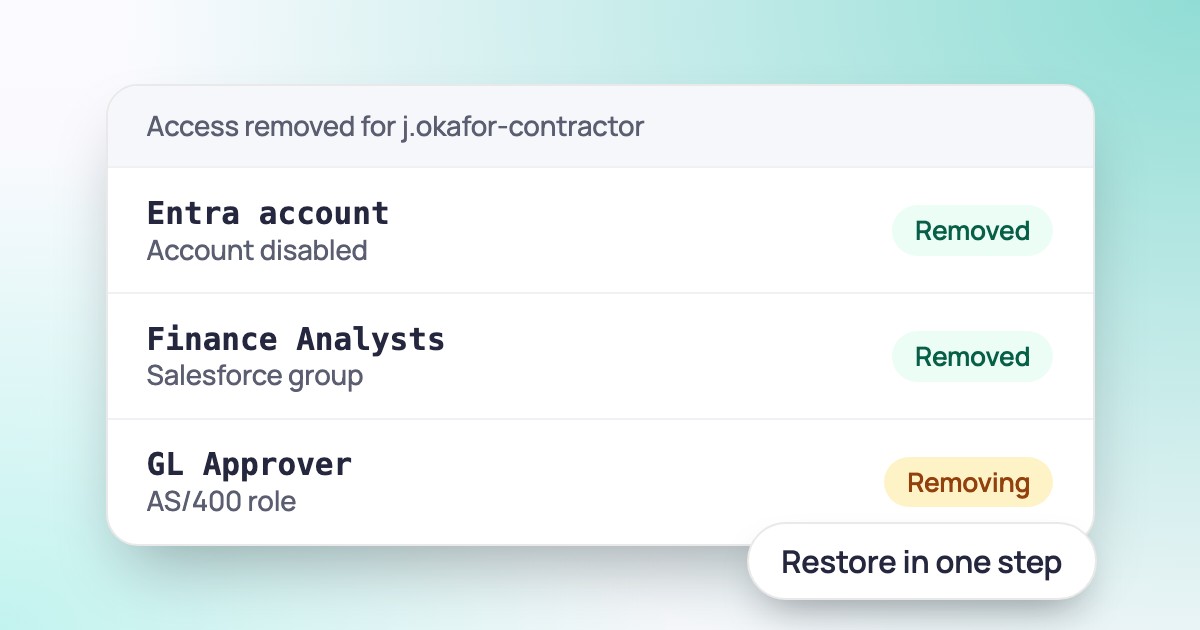
In Explore the answer is on one page. You see the account, its owner and every system it still reaches. You remove that access in one step, and if it was the wrong call, you restore exactly the access the account had.
Search accounts across every connected source and see who owns each one.
Open the grant path from the account, through groups and roles, to the resources at the end.
Deprovision the account and its access is removed in every system it touches. Restore it and the account gets back what it had.
Explore is part of Hydden. Connect your systems, open Explore and pick any account to see its owner, what it reaches and the actions you can take.
Need configuration detail? Technical documentation is available to customers after sign-in.
NewAI agents
See every AI agent, what it has done, and how much any identity can reach.
Governance
Campaign priorities, due-date warnings, changed decisions and edits to active campaigns.
AI agents
Your AI agents can query the identity record and act on it, within the roles you grant.
Request a trial and open Explore on your own data.